redblobgames.com - Let’s write a search engine, part 1 of 2
Blog post: 29 Aug 2025
I have a search box on my web site that uses Google to search my site only using the site: operator [1]. Try it — type in hexagon tiles and you’ll see that it shows my hexagon tile page.
I wondered though: what would it take to make my own search feature that worked as you typed? This is what I’ll implement:
Prototype of search feature
I also wondered if there are other things I might want to build with this data, like Simon Willison’s “related pages” feature [2]. Or browsing by category. Or browsing by date.
The first thing I need to do is extract the text of the pages I want to search, without formatting or images or html. The page might contain this xhtml tree:
<p> <em> Graph search </em> algorithms let us find the shortest path on a map represented as a graph. One popular algorithm is <a href="…"> A* </a> .</p><p> Let's start with <a href="…"> Breadth First Search </a> and work our way up from there.</p>For searching, I’d like to simplify this into a set of lines, each representing one “block” of text:
Graph search algorithms let us find the shortest path on a map represented as a graph. One popular algorithm is A*.Let's start with Breadth First Search and work our way up from there.I can then run a tool like grep on these lines. Will this produce good search results? I don’t know! I need to try it and see.
I started thinking about the extraction algorithm from xhtml to text. Which tags should I consider “block”? I started looking at MDN [3] for a list. I also wondered what to do about situations like this:
<div> This is a block of text <div> inside another </div> block of text</div>Should it be
This is a block of text inside another block of textor
This is a block of textinside anotherblock of textBut I realized that trying to figure this out is a distraction. Maybe it’ll matter. Maybe it won’t. But I don’t know yet, and I shouldn’t prematurely try to solve this problem. Instead, the most important thing is to investigate the biggest unknown. The biggest unknown in this case: is searching over lines even useful?
So I instead tried this (using the xhtml input file, which is the page without the header, nav bar, footer, copyright, etc.):
cat pathfinding/a-star/introduction.bxml \
    | pandoc --read html --write plain --wrap=none \
    | less
I looked at the output and decided this is a reasonable starting point! It gives me the text of the page. I can refine it later.
The next step is to collect the text from all my pages:
fd --extension bxml | while read -r file; do cat "$file" | pandoc --read html --write plain --wrap nonedone >all-pages.txtThat’s only 1.6MB. That could easily be loaded into a web browser. There are many web pages bigger than that!
I made a few changes to my shell script:
- Added a separator with the filename
- Skipped lines that don’t have text (pandoc outputs some blank lines)
fd --extension bxml | while read -r file; do    echo "%%%% $file %%%%";    cat "$file" \
        | pandoc --read html --write plain --wrap none \
        | grep '[a-zA-Z0-9]'done >all-pages.txt
Great! What’s next? Let me load this into a web page:
const words = await (await fetch("./all-pages.txt")).text();const lines = words.split("\n");Now I can search over these lines.
function search1(event) { let results = []; let query = event.currentTarget.value; if (query) { for (let line of lines) { if (line.indexOf(query) >= 0) results.push(line); if (results.length > 10) break; } } document.querySelector("#search-results-1").textContent = results.join("\n");}document.querySelector("#search-query-1").addEventListener('input', search1);Type hexagon into this search box:
Ok, great, this works and is fast! I don’t have to worry about building an inverted index or other optimizations. But it’s hard to see the matches. Let’s add:
- highlight the matches
- trim extra whitespace from the document
- case insensitive match
function escapeHTML(text) { // wish this was built in const map = { '&': '&', '<': '<', '>': '>', '"': '"', "'": ''' }; return text.replace(/[&<>"']/g, m => map[m]);}
function search2(event) { let results = []; let query = event.currentTarget.value; if (query) { query = new RegExp(RegExp.escape(query), 'gi'); for (let line of lines.map(line => line.trim())) { let matches = line.matchAll(query).toArray(); if (matches.length > 0) { let result = ""; let pos = 0; for (let m of matches) { result += escapeHTML(line.slice(pos, m.index)) + "<b>" + m[0] + "</b>"; pos = m.index + m[0].length; } result += escapeHTML(line.slice(pos)); results.push(result); } if (results.length > 10) break; } } document.querySelector("#search-results-2").innerHTML = results.join("\n");}document.querySelector("#search-query-2").addEventListener('input', search2);Type hexagon into this search box:
Hey, that’s looking pretty good. We’re matching lines.
But I want to match documents. I had inserted document separators %%%% into the text file. Let’s use that now.
function parseIntoDocuments(text) {    // results[0] will be "", then [1] is a filename, [2] is text, alternating    const results = text.split(/%%%% (.*?) %%%%$/gm);    if (results[0] !== "") throw \`expected first split to be empty ${results[0]}\`;    if (results[1].length > 100) "expected second split to be filename";    let documents = [];    for (let i = 1; i+1 < results.length; i += 2) {        let filename = results[i];        let lines = results[i+1].split("\n");        lines = lines.map(line => line.trim()); // remove extra whitespace        lines = lines.filter(line => line); // remove blank lines        documents.push({filename, lines});    }    return documents;}const documents = parseIntoDocuments(words);
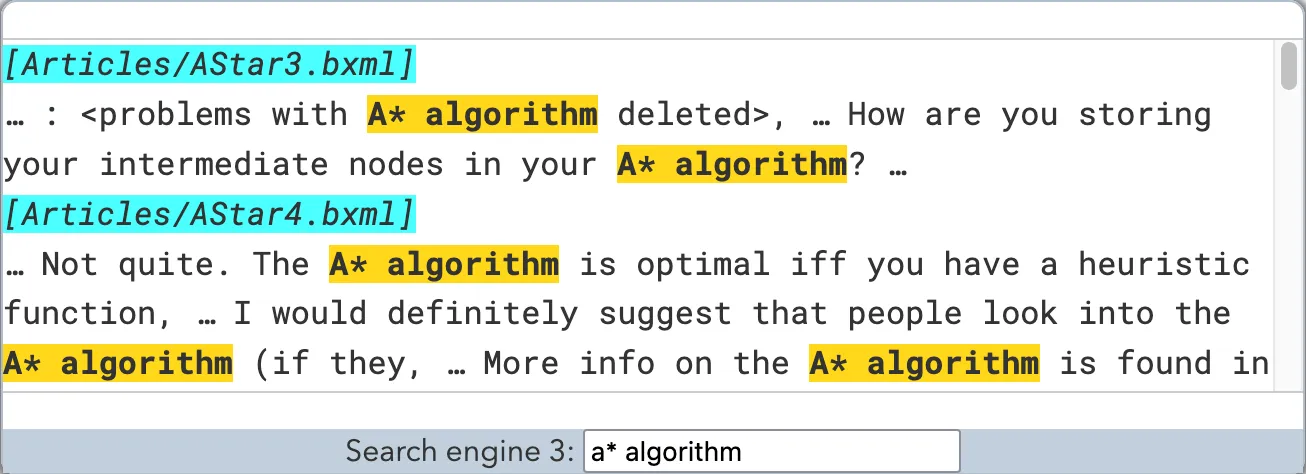
function search3(event) {    const MAX_DOCUMENTS = 5;    const SNIPPET_LENGTH = 3;    let results = []; // list of documents    let query = event.currentTarget.value;    if (query) {        query = new RegExp(RegExp.escape(query), 'gi');        for (let document of documents) {            let snippet = []; // list of lines            for (let line of document.lines) {                let matches = line.matchAll(query).toArray();                if (matches.length > 0) {                    let result = " … ";                    let pos = 0;                    for (let m of matches) {                        result += escapeHTML(line.slice(pos, m.index)) + \`<b>${m[0]}</b>\`;                        pos = m.index + m[0].length;                    }                    result += escapeHTML(line.slice(pos));                    snippet.push(result);                }                if (snippet.length > SNIPPET_LENGTH) break;            }            if (snippet.length > 0) results.push({document, snippet});            if (results.length > MAX_DOCUMENTS) break;        }    }    let html = results         .map(({document, snippet}) => \`<i>[${document.filename}]</i>\n<small>${snippet} …</small>\`)         .join("\n");    document.querySelector("#search-results-3").innerHTML = html;}document.querySelector("#search-query-3").addEventListener('input', search3);
Type hexagon into this search box:
Great! We’re now grouping matches into documents, and limiting how many show up.
But we’re showing the first N matching documents. This is like Ctrl + F over all documents. A “search engine” should show the best documents instead of the first in some arbitrary order. Let’s attempt that in the next post.